For over two decades, Java developers lived with a dirty secret. The language that championed encapsulation with private, protected, and public had a gaping hole at the architectural level: there was no way to hide a package from the outside world. If you made a class public, it was public to everyone—not just your intended consumers, but every single JAR on the classpath.
This led to a phenomenon so painful it earned its own name: Classpath Hell.
In Java 9, the platform finally got its fix: the Java Platform Module System (JPMS), codenamed Project Jigsaw. But what exactly are modules, and why should every Java developer understand them?
Let's use the Richard Feynman Technique—breaking complex ideas into simple, everyday analogies—to understand Java Modules from the ground up.
1. Classpath Hell: The Problem Modules Solve
Before Java 9, your entire application was a flat pile of JAR files thrown onto the classpath. The JVM would search through this pile to find classes at runtime. It sounds simple, but it created catastrophic problems:
- No versioning: If two JARs contained the same class (e.g., different versions of a library), the JVM would silently pick one at random. Your program would crash with mysterious
NoSuchMethodErrorexceptions, and you'd have no idea why. - No encapsulation: Every
publicclass in every JAR was accessible to every other JAR. Internal implementation classes that were never meant to be used externally (likesun.misc.Unsafe) were used by half the ecosystem. - No explicit dependencies: There was no way to declare "this JAR requires that JAR." If a dependency was missing, you'd only find out at runtime, when your application exploded.
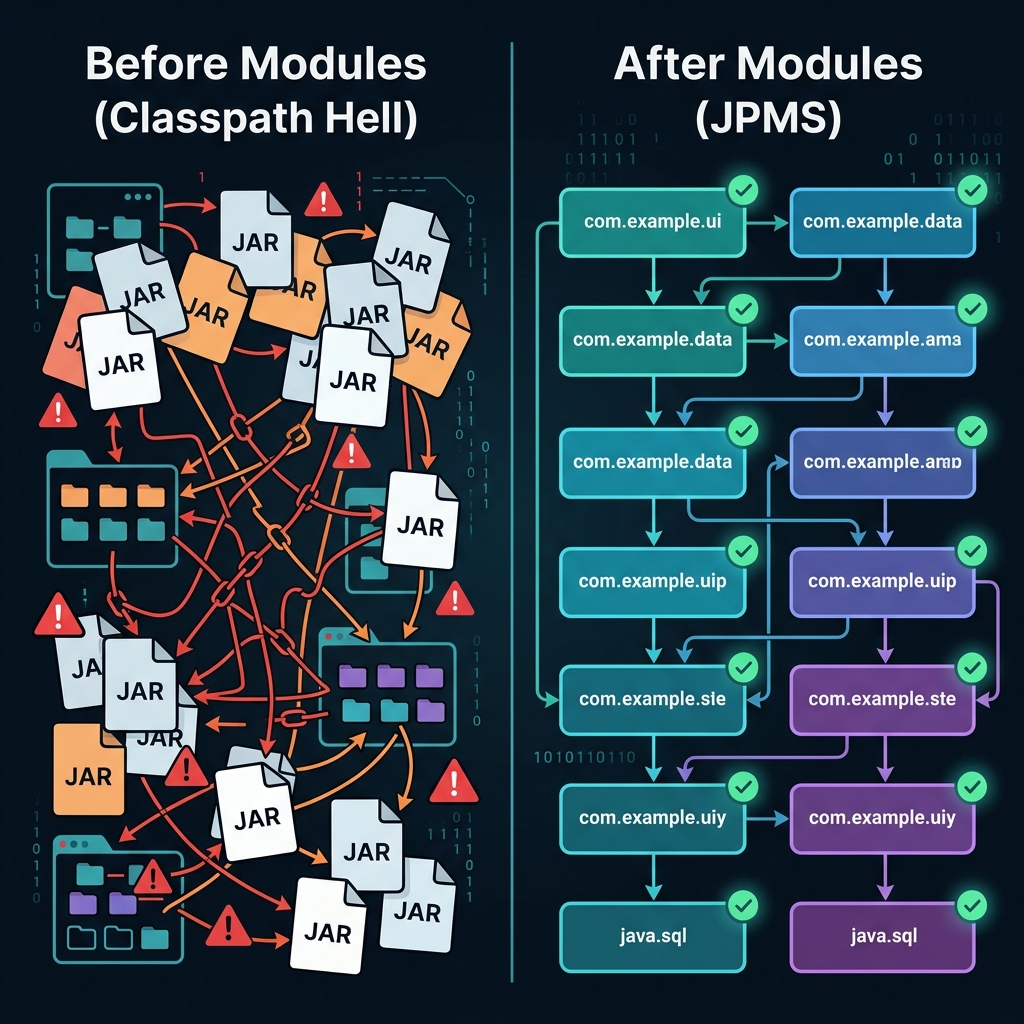 Before modules: a tangled mess of JARs with no boundaries. After modules: clean, explicitly connected components with enforced encapsulation.
Think of the old classpath like a building with no walls, no doors, and no locks. Every room is open to every visitor. Someone can walk into the CEO's office, rummage through confidential files, and leave—and the building has no mechanism to stop them.
Modules add the walls, the doors, and the locks.
2. The City Analogy: Modules as Districts
The best way to understand the Java Module System is to think of a well-planned city.
 Each module is a self-contained district with walls, controlled entry points, and explicit connections to other districts.
Imagine a modern city divided into districts (modules). Each district has:
- Walls: A hard boundary that separates its internal buildings (packages) from the outside world.
- Public-facing shops: Some buildings are deliberately placed at the district's entrance, visible and accessible to visitors (these are exported packages).
- Private facilities: Other buildings—warehouses, utility rooms, staff quarters—are hidden behind the walls, invisible to outsiders (these are internal packages).
- Bridges with guards: To travel between districts, you must cross a controlled bridge. The guard checks if your district has a permit (
requires) to access the destination district. No permit? No entry.
This is exactly how Java modules work. A module is a named, self-describing collection of packages that explicitly declares:
- What it needs (
requires) — which other modules it depends on. - What it shares (
exports) — which of its packages are accessible to other modules. - What it hides — everything not exported is completely invisible, even if the classes are
public.
3. The Module Descriptor: Your Blueprint
Every module has a single file that acts as its identity card and access policy: module-info.java. This file sits at the root of your module's source tree, and the compiler enforces every rule declared in it.
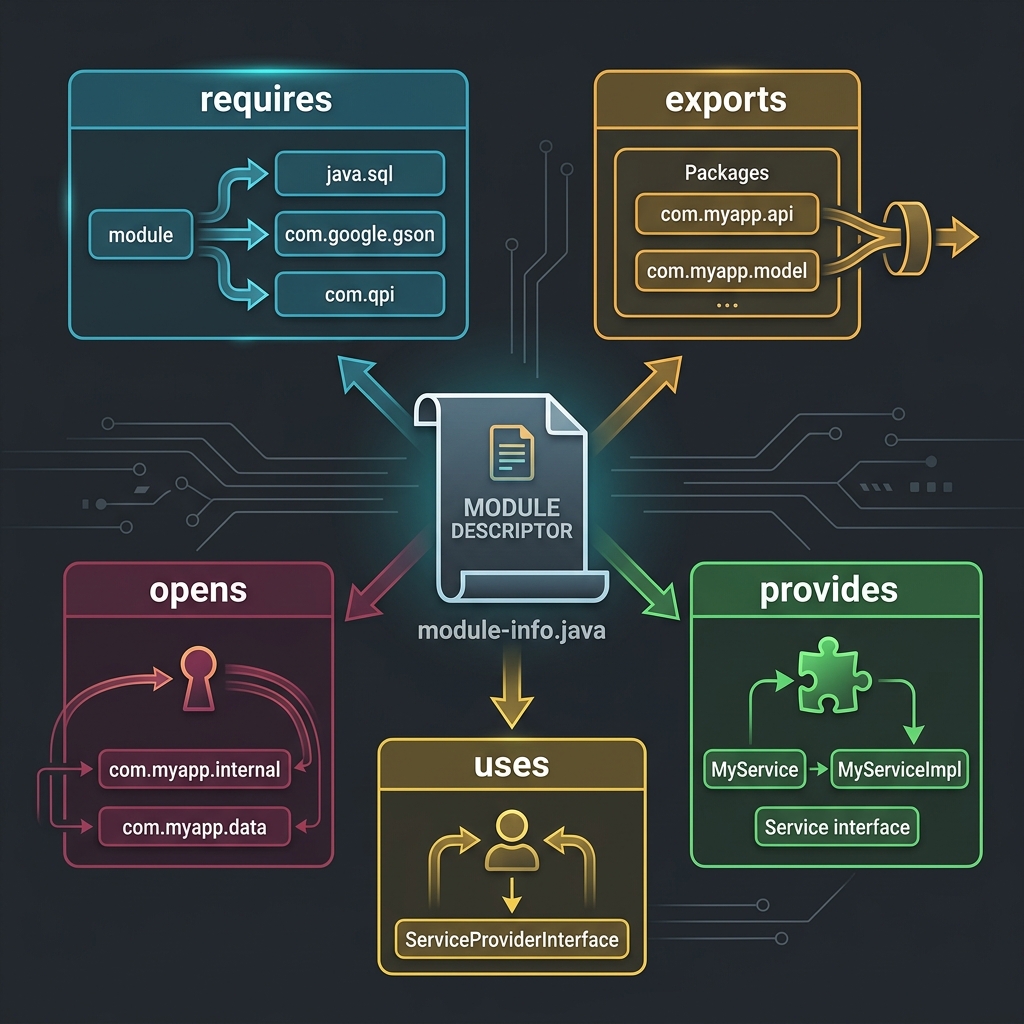 The module-info.java file is the control center of every module, declaring its dependencies, exports, and service bindings.
Here's what each clause does:
requires— "I depend on this module." The compiler and JVM will verify that the required module is present. If it's missing, your program won't even compile—no more runtime surprises.exports— "I'm making this package available to the world." Only exported packages can be accessed by other modules. Everything else is locked down.requires transitive— "I depend on this module, and so should anyone who depends on me." This forwards a dependency through the chain, so consumers don't have to manually list every transitive dependency.opens— "I'm allowing runtime reflection access to this package." This is critical for frameworks like Spring and Hibernate that rely on reflection to inspect and instantiate classes.provides ... with— "I implement this service interface with this concrete class." This enables theServiceLoaderpattern for pluggable architectures.uses— "I consume this service interface." The counterpart toprovides.
A simple module descriptor looks like this:
module com.myapp.billing {
    requires java.sql;
    requires com.myapp.common;
    exports com.myapp.billing.api;
    opens com.myapp.billing.model to com.google.gson;
}
This reads naturally: "The billing module needs java.sql and the common module. It exposes its API package to the world. It allows Gson to reflect into its model package for JSON serialization."
4. The Dependency Graph: No More Surprises
One of the most powerful consequences of the module system is the dependency graph. Because every module explicitly declares what it requires, the JVM can build a complete picture of your application's dependency tree before a single line of code runs.
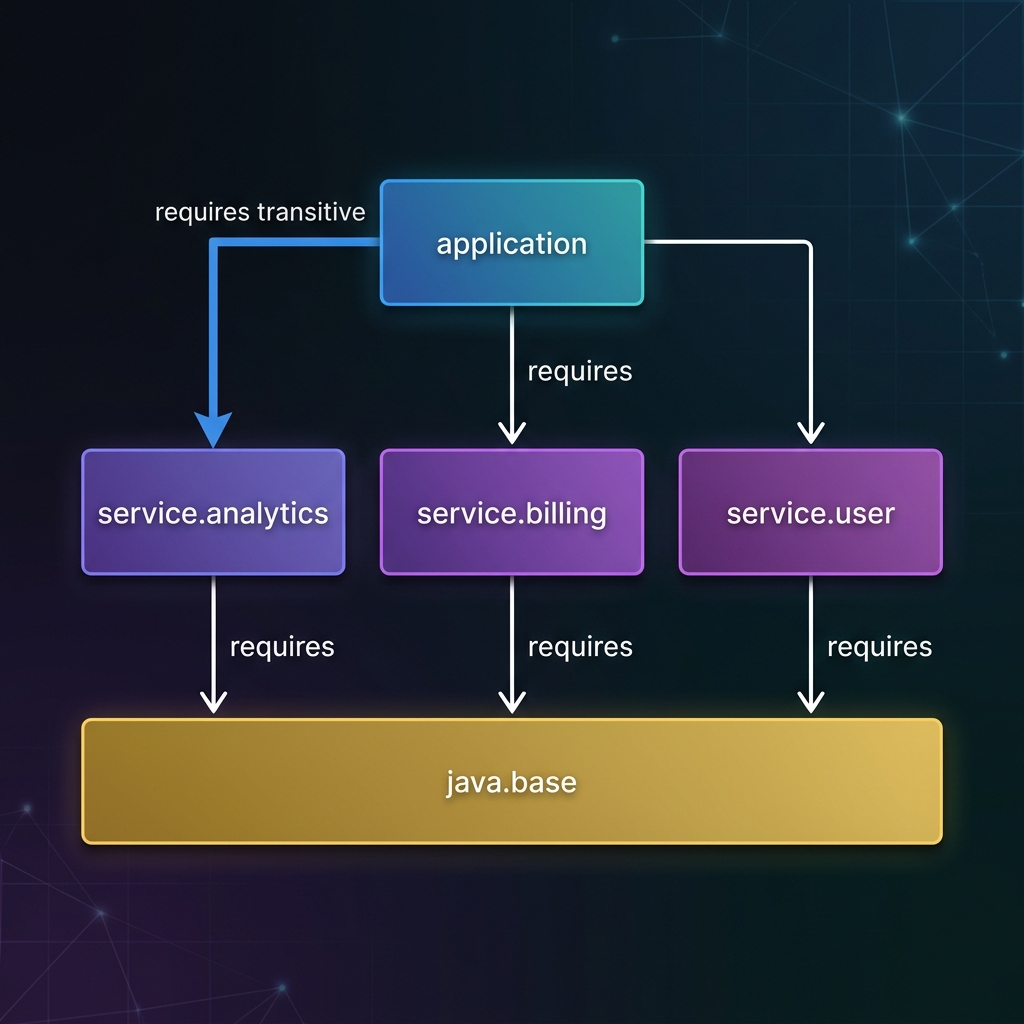 Modules form a clear, layered dependency graph. The
 requires transitive keyword forwards dependencies through the chain.
This solves the three nightmares of Classpath Hell:
- Missing dependencies are caught at startup. If module A requires module B, and B isn't on the module path, the JVM refuses to start. No more
ClassNotFoundExceptionafter 3 hours of production runtime. - Duplicate modules are forbidden. The module system enforces that each module appears exactly once. No more silent conflicts between JAR versions.
- Circular dependencies are illegal. If module A requires B, and B requires A, the compiler rejects it. This forces you into clean, layered architectures.
Every module implicitly depends on java.base—the foundational module containing java.lang, java.util, java.io, and other core packages. You never need to write requires java.base; it's always there.
5. Custom Runtimes: Shipping Only What You Need
Here's where modules deliver perhaps their most dramatic practical benefit. Before Java 9, deploying a Java application meant shipping the entire JRE—a ~300MB behemoth containing CORBA, Swing, JavaFX, JNDI, and dozens of other APIs your application never touched.
With modules, the JDK itself is modularized into ~70 platform modules. And Java provides a tool called jlink that lets you assemble a custom runtime image containing only the modules your application actually uses.
 jlink strips the JDK down to only the modules your application needs, reducing deployment size by up to 90%.
A microservice that only uses java.base and java.sql can be packaged into a self-contained runtime of ~30MB instead of 300MB. This is transformative for:
- Container deployments: Smaller Docker images mean faster pulls, faster scaling, and lower storage costs.
- Serverless functions: Smaller cold-start times when the runtime footprint is minimal.
- Edge devices and IoT: Java can now run in memory-constrained environments where the full JRE was simply too large.
The command is straightforward:
jlink --module-path $JAVA_HOME/jmods:myapp.jar \
      --add-modules com.myapp \
      --output custom-runtime
This produces a complete, self-contained runtime directory that you can ship without requiring Java to be installed on the target machine.
The Verdict
The Java Platform Module System represents the most significant architectural change to Java since generics. By introducing explicit boundaries, enforced dependencies, and strong encapsulation at the module level, JPMS finally gives Java the tools to build large-scale systems that are maintainable, secure, and efficient.
Classpath Hell isn't just an inconvenience—it's an architectural cancer that silently degrades reliability as systems grow. Modules are the cure. They force you to think about your architecture explicitly, declare your boundaries clearly, and ship only what you need.
The walls, doors, and locks are now built into the language itself.
References & Further Reading
This post synthesizes concepts from the core Java literature:
- Modern Java in Action by Raoul-Gabriel Urma, Mario Fusco, and Alan Mycroft — Chapter 14: The Java Module System.
- Java: The Complete Reference (12th Edition) by Herbert Schildt — Chapter 16: Modules.
- Core Java, Volume I: Fundamentals by Cay S. Horstmann — Chapter 12: The Java Platform Module System.
- Effective Java (3rd Edition) by Joshua Bloch.