C++ has a reputation for being intimidating.
When developers transition from garbage-collected languages like Python or JavaScript to C++, they are suddenly confronted with concepts like manual memory management, raw pointers, stack vs. heap allocation, compilation pipelines, and strict type systems.
It is easy to get lost in syntax rules and pointer arithmetic. But as the legendary physicist Richard Feynman famously demonstrated, if you cannot explain a topic using simple, physical analogies, you do not truly understand it.
In this guide, inspired by Bro Code's masterclass course, we demystify C++ from the ground up using intuitive real-world metaphors.
1. Source Code to Executable: The Architect's Blueprint
In interpreted languages (like Python), an interpreter reads your code line-by-line while the program runs, acting like a live translator sitting next to you.
C++ is a compiled language. Your source code is not executed directly—it goes through a multi-stage manufacturing pipeline:
 The C++ Compilation Pipeline: Human-readable source code is compiled into object code and linked into a high-speed native binary executable.
Think of writing C++ as drafting an Architect's Blueprint:
- Preprocessing (
#include): The blueprint copier pastes all required standard sub-blueprints (like<iostream>) into your file before building. - Compilation (
g++orclang): The chief engineer translates your blueprint into precise machine assembly instructions (Object Files.o). - Linking: The assembly manager stitches your object files and external libraries together into a single, high-speed physical machine (the binary executable
.exeora.out).
#include <iostream>

int main() {
    // The entry point of every C++ executable
    std::cout << "Hello, World!" << std::endl;
    return 0;
}
Because C++ compiles directly into machine instructions tailored for your CPU, it bypasses virtual machine overhead and yields unmatched execution speed.
Automating the Build: The Makefile Foreman
As your program grows from a single file to dozens of modules, manually typing g++ -c file1.cpp, g++ -c file2.cpp, and g++ file1.o file2.o -o my_app becomes tedious and error-prone.
Enter GNU Make and the Makefile.
Think of a Makefile as an Automated Construction Foreman:
Target ← Prerequisites : Recipe Commands
- Incremental Building: The foreman checks timestamps on your source files. If
utils.cpphasn't changed since the last build,makeskips compiling it, saving massive build time. - Standardized Recipes: Defines compiler flags (
-Wall -Wextra -std=c++17), include directories, and build targets in one clean configuration file.
Here is a modern, production-grade Makefile for C++ projects:
# Compiler and Flags
CXX      := g++
CXXFLAGS := -std=c++17 -Wall -Wextra -O2
LDFLAGS  :=

# Directories and Files
SRC_DIR  := src
BUILD_DIR:= build
TARGET   := my_program

# Automatically find all .cpp source files
SRCS     := $(wildcard $(SRC_DIR)/*.cpp) main.cpp
OBJS     := $(patsubst %.cpp, $(BUILD_DIR)/%.o, $(notdir $(SRCS)))

# Default rule (runs when you type 'make')
all: $(TARGET)

# Link object files into final executable
$(TARGET): $(OBJS)
	@echo "Linking $(TARGET)..."
	$(CXX) $(OBJS) -o $@ $(LDFLAGS)

# Compile C++ source files into object files
$(BUILD_DIR)/%.o: %.cpp | $(BUILD_DIR)
	@echo "Compiling $<..."
	$(CXX) $(CXXFLAGS) -c $< -o $@

$(BUILD_DIR)/%.o: $(SRC_DIR)/%.cpp | $(BUILD_DIR)
	@echo "Compiling $<..."
	$(CXX) $(CXXFLAGS) -c $< -o $@

# Create build directory if missing
$(BUILD_DIR):
	mkdir -p $(BUILD_DIR)

# Clean built artifacts
clean:
	@echo "Cleaning build directory..."
	rm -rf $(BUILD_DIR) $(TARGET)

.PHONY: all clean
With this Makefile in your root directory:
- Type
maketo compile your entire application. - Type
./my_programto execute it. - Type
make cleanto remove compiled object files and binaries.
2. Variables & Data Types: The Labeled Warehouse
In memory, everything is ultimately a sequence of 1s and 0s. A variable in C++ is simply a labeled container placed in a warehouse (RAM) with a fixed size and type.
 Variables as distinct, color-coded glass containers in a memory warehouse, each designed for a specific data size and type.
Unlike dynamically typed languages, C++ requires you to explicitly declare what type of container you need so the compiler can reserve the exact number of bytes:
int age = 25;           // 4 bytes: whole integer box
double price = 19.99;   // 8 bytes: high-precision decimal container
char grade = 'A';       // 1 byte: single character slot
bool is_active = true;  // 1 byte: boolean toggle switch (true/false)
std::string name = "Chema"; // Dynamic sequence of characters
Memory Container = Fixed Byte Size + Dedicated Data Type
3. Pointers & Memory Addresses: The Hotel Keycard
The concept that confuses newcomers most in C++ is the Pointer.
Imagine a luxury hotel with hundreds of rooms:
- The value is whatever is inside the room (e.g., a guest's luggage, value
42). - The memory address is the room number on the door (e.g.,
0x7fff5fbff61c). - The pointer is a smart keycard that holds the room number and lets you access the contents inside that room from anywhere.
 Pointers hold the memory address (room number) of a variable rather than storing the value directly.
int score = 100;         // The variable inside the room
int* ptr = &score;       // ptr stores the ADDRESS (&) of score

std::cout << score << "\n"; // Prints value: 100
std::cout << &score << "\n"; // Prints memory address: 0x7fff5fbff61c
std::cout << ptr << "\n";    // Prints memory address: 0x7fff5fbff61c
std::cout << *ptr << "\n";   // Dereference operator (*): Unlocks & reads value inside: 100
Pass-by-Value vs. Pass-by-Reference
When passing variables into functions:
- Pass-by-Value (
void foo(int x)): Makes a full photocopy of the paper. If the function edits the photocopy, your original remains unchanged. - Pass-by-Reference (
void foo(int &x)): Hands over the actual home address. Any changes made inside the function directly modify the original variable!
// Swapping values using references (pass-by-reference)
void swap(int &a, int &b) {
    int temp = a;
    a = b;
    b = temp;
}
4. Stack vs. Heap: Desk Scratchpad vs. Rental Warehouse
Where do your variables live in RAM during execution? C++ divides memory into two primary zones: The Stack and The Heap.
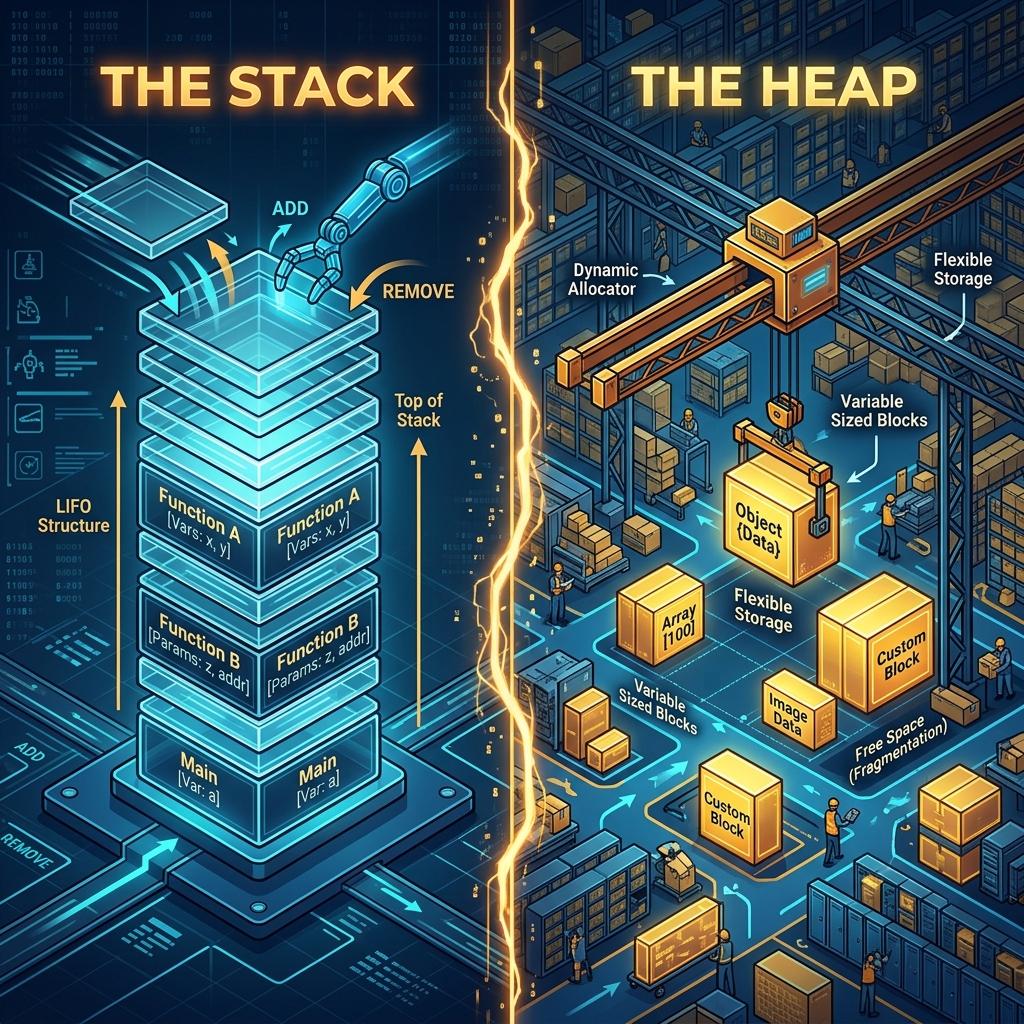 The Stack acts like a fast LIFO desk scratchpad for automatic local variables; The Heap acts like a vast rental warehouse for dynamic long-term storage.
The Stack (Automatic Memory)
Think of the Stack as a desk scratchpad.
- When a function is called, a stack frame is added to the top of the pile.
- Fast, organized, and automatically cleaned up when the function ends (Last-In, First-Out).
- Fixed capacity—allocate too much on the stack, and you suffer a Stack Overflow.
The Heap (Dynamic Memory)
Think of the Heap as a giant rental storage warehouse.
- You explicitly request storage space at runtime using
new. - The space stays allocated as long as your program runs—until you explicitly return it using
delete. - Memory Leak: If you forget to call
delete, the storage locker stays rented forever even if your program no longer has the key card pointer to reach it!
void heap_example() {
    // Allocate integer dynamically on the Heap
    int* heap_ptr = new int(42);

    std::cout << *heap_ptr << std::endl; // Access heap value

    // CRITICAL: Deallocate dynamic memory to prevent leaks
    delete heap_ptr;
    heap_ptr = nullptr; // Clear dangling pointer
}
5. Object-Oriented C++: Blueprints & The Assembly Line
C++ brings structure to complex systems through Object-Oriented Programming (OOP).
Think of a Class as an automotive factory blueprint:
- Attributes (Member Variables): Specifications like
color,horse_power, andfuel_level. - Methods (Member Functions): Capabilities like
accelerate(),brake(), andrefuel().
An Object (Instance) is an actual physical car manufactured on the assembly line using that blueprint.
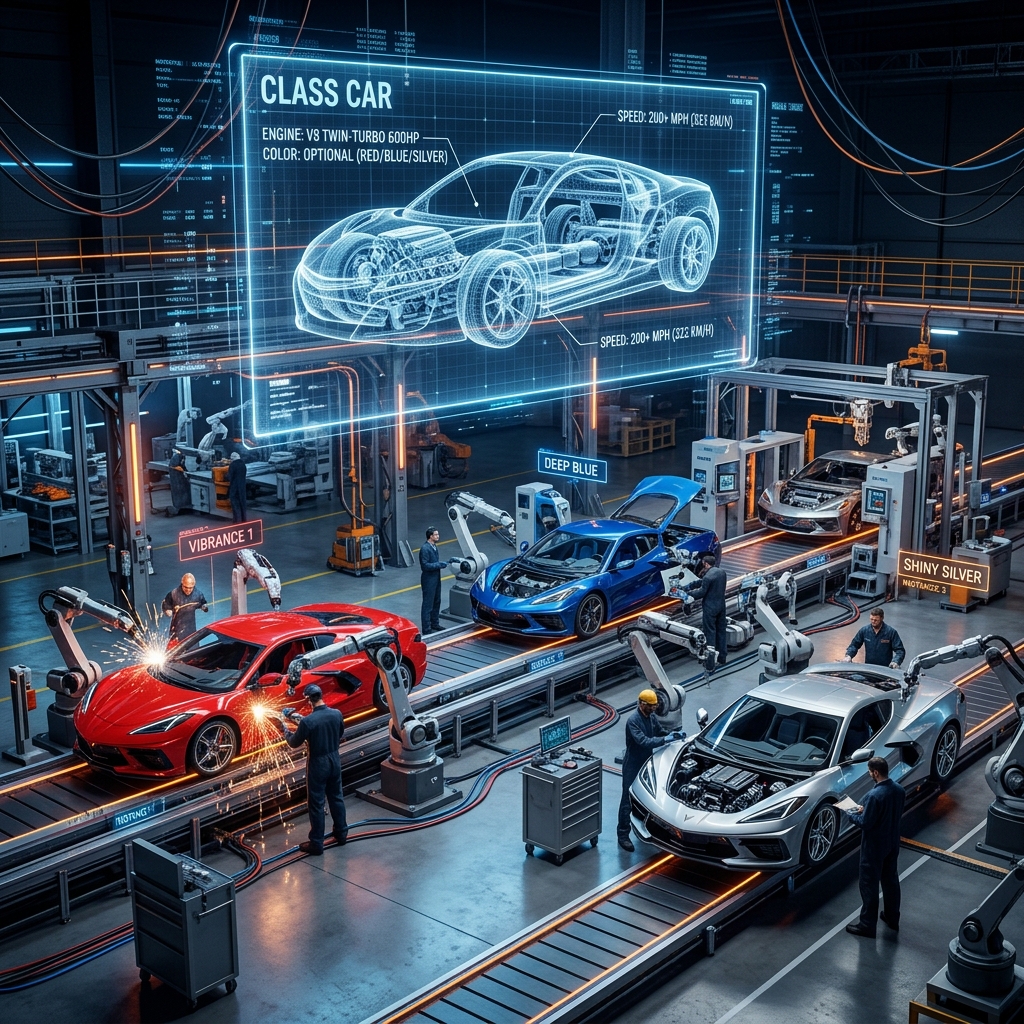 A C++ Class acts as a factory blueprint; Objects are concrete instances instantiated on the assembly line with custom state and behavior.
#include <iostream>
#include <string>

class Car {
private:
    std::string brand;
    int speed;

public:
    // Constructor
    Car(std::string b, int s) : brand(b), speed(s) {}

    void accelerate(int increment) {
        speed += increment;
        std::cout << brand << " is now going " << speed << " km/h!\n";
    }
};

int main() {
    // Instantiating objects on the Stack
    Car car1("Porsche", 120);
    Car car2("Tesla", 100);

    car1.accelerate(30); // Porsche is now going 150 km/h!
    return 0;
}
Summary & Key Takeaways
| C++ Concept | Feynman Analogy | Core Mechanism | Why It Matters |
|---|---|---|---|
| Compilation Pipeline | Architect's Blueprint | Source → Preprocessing → Machine Code Linker | Delivers max execution performance |
| Makefile | Construction Foreman | Timestamp checking & target rule recipes | Automates multi-file builds cleanly |
| Variables & Types | Labeled Warehouse Box | Fixed-size memory slot reservation | Prevents type mismatches & memory bugs |
| Pointer & Address | Hotel Keycard & Room # | Storing address (&) & dereferencing (*) | Direct memory control & high speed |
| Stack Memory | Desk Scratchpad | LIFO automatic function stack frames | Blazing fast, auto-managed memory |
| Heap Memory | Rental Warehouse Locker | Explicit new / delete allocation | Dynamic lifetime for arbitrary data sizes |
| Class & Object | Blueprint & Car Instance | Encapsulation of state & behaviors | Scalable software architecture |
Conclusion & Verdict
C++ is not an opaque mystery. At its foundation, it gives you raw, unvarnished access to computer hardware:
- Variables are fixed memory slots.
- Pointers are room numbers holding addresses.
- The Stack is your fast automatic scratchpad.
- The Heap is your dynamic warehouse requiring discipline (
new&delete). - Classes are blueprints for instantiating structured objects.
When you look past syntax intimidation and visualize the underlying memory mechanics, C++ transforms into one of the most expressive, powerful, and elegant engineering tools ever created.